1. First things first: you're going to need a copy of Repetier.
If you are upgrading an existing 3D printer to use a V6 HotEnd, you should try to get a copy of your current firmware from your printer's manufacturer.
If you're building a new printer, or simply want to upgrade to the latest version of Repetier, download it at:
https://www.repetier.com/download-now/
If you download a fresh version of Repetier you'll have to configure more settings than the ones mentioned in this guide so that it will work well with your printer.

2. Almost all printers use Arduino IDE to upload fresh firmware, so download it at:
https://www.arduino.cc/en/Main/Software
3. Unzip Repetier from the zip file you downloaded and put the resulting folder anywhere on your computer for safekeeping.
Inside this folder, navigate to the Repetier sub-folder, and open the file:
Repetier.ino
This should open every file of your firmware.
Find the tab:
Configuration.h
4. Rather than manually editing the configuration file, you can also upload it to the online configurator.
6. Manual Editing:
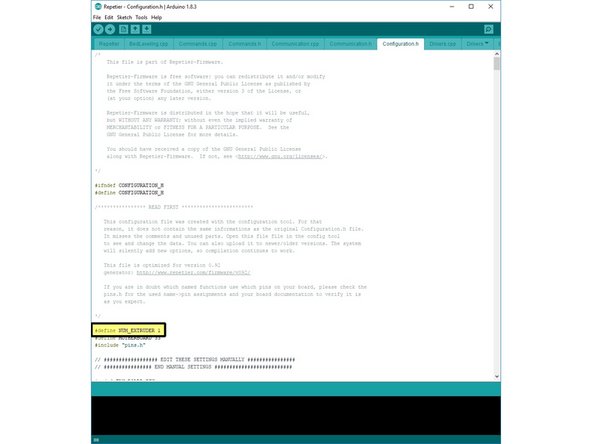
In the Configuration.h file, the third un-commented line defines the number of extruders (HotEnds) your printer has. Update this line to:
#define NUM_EXTRUDER 2.
7. Online Editor
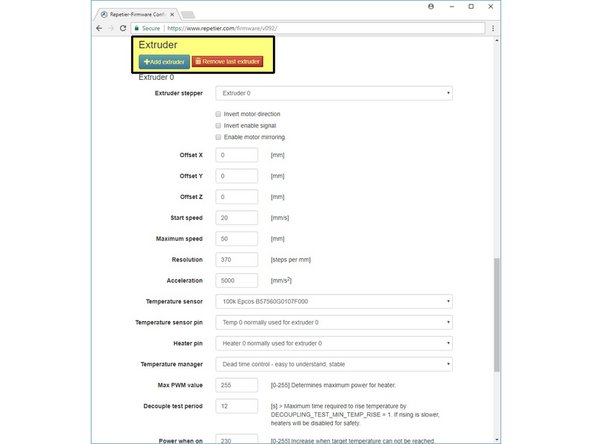
In the
Tools Tab
scroll down to the:
Extruder Section.
Click:
Add Extruder
to add a second HotEnd to your firmware configuration.


8. Manual Editing:
In the file:
configuration.h
find the highlighted line and update it to:
#define EXT0_TEMPSENSOR_TYPE 8.
You also need to change the temperature sensor type for the second HotEnd in the Chimera. If your configuration file has the line.
#define EXT1_TEMPSENSOR_TYPE
Then change that value to 8 as well. If not, you should upload your.
configuration.h
file to the online configuration tool and start from the beginning of this guide.
9. Online Tool
In the:
Extruder Section, select ATC Semitec 104-GT2
from the list of temperature sensors. Do this for both of your extruders.


10. Manual editing:
Change:
#define MIN_DEFECT_TEMPERATURE 5
To detect a detached thermistor
Change:
#define MAXTEMP 285
To prevent your hotend from overheating.
Change:
#define MAX_DEFECT_TEMPERATURE 290
To shut off your printer if overheated.
11. Online Editing:
Change:
Maximum extruder temperature 285
to prevent your HotEnd from overheating.
Change:
Minimum defect temperature 5
To detect if thermistor is detached.
Change:
Maximum defect temperature 290
To shut off your printer if overheated.
12. Upload the new firmware to your electronics as you normally would. Typically this means plugging in your printer to your computer, selecting the correct COM port and board type, and pressing the upload button.
13. If you're unsure of how to update your printer's firmware, check with its manufacturer.