1. First things first: you're going to need a copy of Marlin.
If you are upgrading an existing 3D printer to use Cyclops, you should try to get a copy of your current firmware from your printer's manufacturer.
If you're building a new printer, or simply want to upgrade to the latest version of Marlin, download it at:
http://marlinfw.org/meta/download/
If you download a fresh version of Marlin you'll have to configure more settings than the ones mentioned in this guide so that it will work well with your printer.

2. Almost all printers use Arduino IDE to upload fresh firmware, so download it at:
https://www.arduino.cc/en/Main/Software

3. Unzip Marlin from the zip file you downloaded and put the resulting folder anywhere on your computer for safekeeping.
Inside this folder, navigate to the Marlin sub-folder, and open the file:
Marlin.ino
This should open every file in Marlin.
Find the tab:
Configuration.h


4. To set up the Cyclops+ in non-mixing mode (recommended) set extruders to:
#define EXTRUDERS 2
Next, you need to enable a single nozzle:
#define SINGLENOZZLE
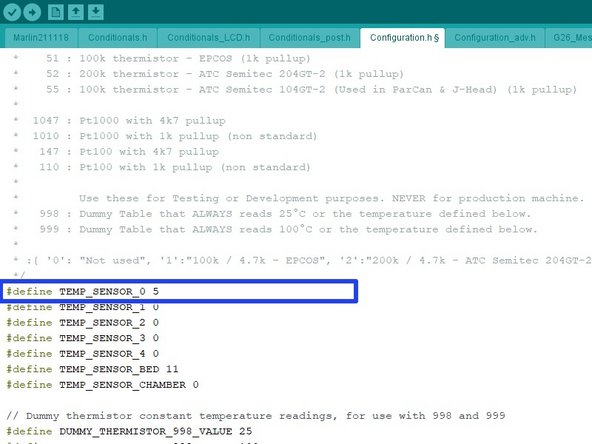
5. Change:
TEMP_SENSOR_0
to
TEMP_SENSOR_5

6. Set:
HEATER_0_MAXTEMP 285
The max settable temperature on the LCD is 15°C less than the firmware max temperature, therefore you will need to set the max temperature to 300°C in the firmware in order to hot tighten at 285°C.
Remember to change the max temperature back to 285°C after you have hot tightened.
7. Upload the new firmware to your electronics as you normally would.
Typically this means plugging in your printer to your computer, selecting the correct COM port and board type, and pressing the upload button. If you're unsure of how to update your printer's firmware, check with its manufacturer.
8. Make sure normal retraction value is set to 1mm, this is the value we have found works the best.
Set the retraction for tool change to 1.5 - 2 mm. Lengths longer than 2 mm may cause backflow issues.
Look for a wipe and purge tower option, this will create a sacrificial tower to purge the old colour before continuing to the next part of the print.
We have found Cyclops+ to work best with a print speed of 25-35 mm/s