1. First things first: you're going to need a copy of RepRap Firmware.
Either download a fresh version from GitHub, or edit your existing one.
You can edit your existing firmware either through the online configuration tool, or through G-Code.
If you download a fresh version of RepRapFirmware you'll have to configure more settings than the ones mentioned in this guide so that it will work well with your printer.
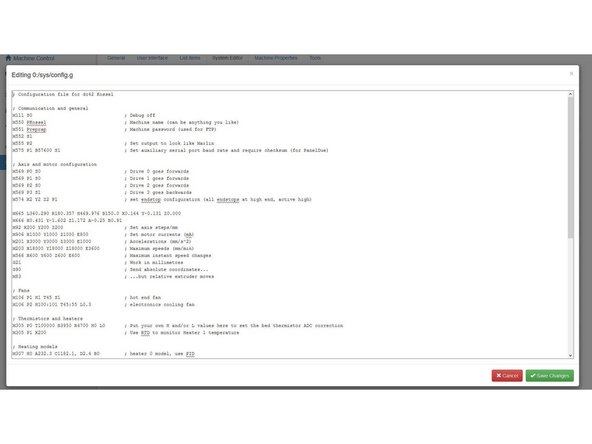


2. Manual Editing:
In the web interface, go to the Settings/System Editor page and click on the config.g file to open it
For firmware versions 1.16 and earlier, change the line:
M305 P1
To the following:
M305 P1 T100000 B4388
For firmware versions 1.17 and later, change the line:
M305 P1
To this instead:
M305 P1 T100000 B4725 C7.06e-8
3. Online Configuration Tool:
Go to https://configurator.reprapfirmware.org/
If you have previously saved a .json configuration file for your printer, select "Use existing configuration" and browse to your .json file. If not, you will need to enter the parameters for your printer on each screen.
On the Heaters page, click on the Calculate Thermistor Coefficients button in the Heaters tab, and select Semitec 104-GT2 (used by E3D) from the drop-down menu.

4. Manual editing:
Update your maximum temperature by sending the following G-Code command to your printer:
M143 S245
While the V6's metal components can handle very high temperatures, the PTFE lining of the Lite6 will deform at temperatures over 245°C
5. Online Editing:
Update your maximum temperature by going to the heaters tab and changing the option to 245.
6. Simply restart your printer for your new values to come into effect.
If you're unsure of how to update your printer's firmware, check with its manufacturer.